Justification of Topic:
Introduction:
Step 1: Creating an Account in Dropbox to Generate Access Token.
- Go to the Dropbox (https://www.dropbox.com) and create a Dropbox Account.
- Click “Sign In” button and it will redirect to login page. There we have “create an account” button after clicking it will redirect to create account page, here need to enter the details and if we click “Create an account” button, then the dropbox account has been created.
- Go back to the Dropbox (https://www.dropbox.com) and Login into the Account. After Login, use the url(https://www.dropbox.com/developers/apps/create), it will redirect to “Create a new app on the DBX Platform” page, here we need to implement the following steps
- Choose an API: Here need to select “Dropbox API” radio button.
- Choose the type of access you need: Here need to select “Full Dropbox” radion button.
- Name your app: Please enter some name and Please click check I agree checkbox and then click “Create app” button.

Step 2: CREATE A NEW SCRIPT IN FILEMAKER DATABASE.
- In the FileMaker database create container field and store the file in container field that you want to upload. Also create text field and store access token that we have noted.
- Create a new script to Upload File to Dropbox.
- Store the container field value in variable, please see below image

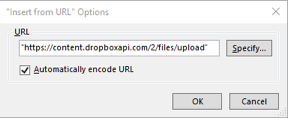
- We are using the “Insert from URL” script step. In that we need to specify the url to upload file to dropbox as given in the following image.
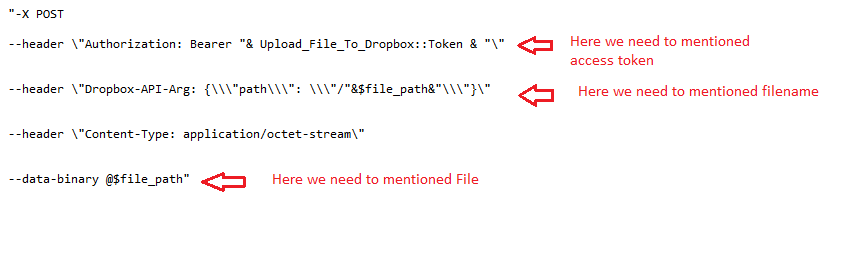
- In the Specify cURL options, we need to provide the access token that we have stored in the field and also need to provide the Filename and File that we have stored in variable. The content of the message as given in the following image.
- After “Insert from URL” step executed, the File will be uploaded to the Dropbox.
Conclusion:
Our team knows all about transitioning, migrating, converting, and upgrading for FileMaker. Companies that require FileMaker Integration can also use our services. Naethra Technologies Pvt Ltd have worked with clients from the USA, Australia, and Singapore and will complete your FileMaker assignment in the best possible way at a lower price but at the same or higher level of excellence.
Comprehensive Full Stack Development Outsourcing
Mastering Web, Mobile Native, and Cross-Platform Applications