
Overview
Payment gateway
Integration
A sandbox account
As with any secure payment integration, you will first need to set up authorization. The Braintree sandbox allows you to set up a test environment to run transactions using test credit card numbers and explore the functionality of the Braintree gateway.
Client and server SDKs
Our client SDK enables you to securely collect payment information from your customers and the server SDK enables you to act on the collected payment information.
We have SDKs for the following client platforms and server languages:
- Client SDKs for Android, iOS, and JavaScript
- Server SDKs for Java, .NET, Node.js, PHP, Python, and Ruby
How it works
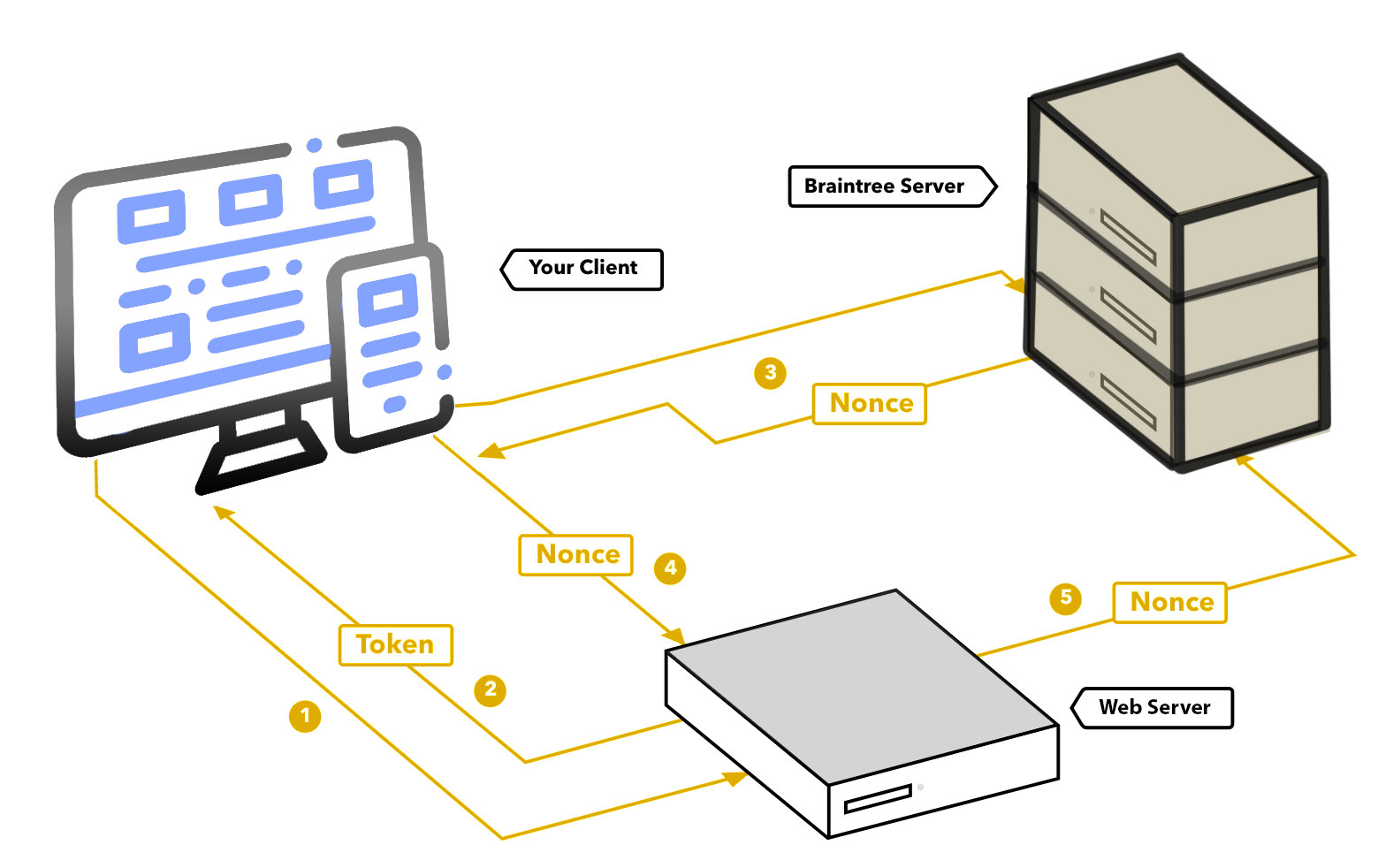
This diagram shows how your client, your server, and Braintree interact:
Step 1
Your front-end requests a client token from your server and initializes the client SDK.
Step 2
Your server generates and sends a client token back to your client using the server SDK.
Step 3
The customer submits payment information, the client SDK communicates that information to Braintree and returns a payment method nonce.
Step 4
Your front-end sends the payment method nonce to your server.
Step 5
Your server code receives the payment method nonce and then uses the server SDK to create a transaction.
Drop-in UI
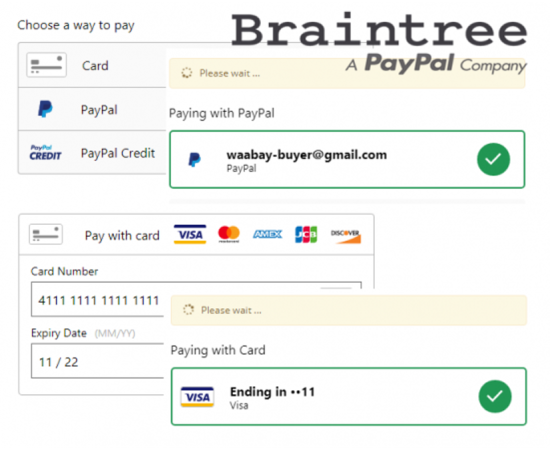
Drop-in UI is a ready-made payment UI that offers the quickest way to integrate and start securely accepting payments with Braintree.
Quick, easy integrations
Quickly integrate Drop-in into your app or website’s checkout flow.
User-friendly, customizable UI
Customize the checkout form to meet your needs and fit your brand requirements.
Accept PayPal, cards, and more
Easily add new payment method types to your form.
Add the Drop-in UI
To load the Drop-in UI on the page, we’ll need to do 3 things:
2. Get a tokenization key
3. Add the Drop-in UI markup
Include the Braintree client SDK
We’ll use the latest Braintree JavaScript SDK. Add the following code just above the closing </head>
<!– includes the Braintree JS client SDK –>
<script src=”https://js.braintreegateway.com/web/dropin/1.36.1/js/dropin.min.js”></script>
<!– includes jQuery –>
<script src=”http://code.jquery.com/jquery-3.2.1.min.js” crossorigin=”anonymous”></script>
Get a tokenization key
There are 2 ways to authorize the client to collect payment information:
• A tokenization key, which is a static key with reduced privileges that authorizes a subset of Braintree’s client API capabilities
Add the Drop-in UI markup
Drop-in UI consists of a small amount of HTML markup, which will be initialized using the Braintree JavaScript SDK we included above.
The paymentMethodNonce is a string returned by the client SDK. It’s a one-time-use reference to the payment information that your customer provided in your payment form.
<div id=”dropin-wrapper”>
<div id=”checkout-message”></div>
<div id=”dropin-container”></div>
<button id=”submit-button”>Submit payment</button>
</div>
<script>
var button = document.querySelector(‘#submit-button’);
braintree.dropin.create({
// Insert your tokenization key here
authorization: ‘<use_your_tokenization_key>’,
container: ‘#dropin-container’
}, function (createErr, instance) {
button.addEventListener(‘click’, function () {
instance.requestPaymentMethod(function (requestPaymentMethodErr, payload) {
// When the user clicks on the ‘Submit payment’ button this code will send the
// encrypted payment information in a variable called a payment method nonce
$.ajax({
type: ‘POST’,
url: ‘/checkout’,
data: {‘paymentMethodNonce‘: payload.nonce}
}).done(function(result) {
// Tear down the Drop-in UI
instance.teardown(function (teardownErr) {
if (teardownErr) {
console.error(‘Could not tear down Drop-in UI!’);
} else {
console.info(‘Drop-in UI has been torn down!’);
// Remove the ‘Submit payment’ button
$(‘#submit-button’).remove();
}
});
if (result.success) {
$(‘#checkout-message’).html(‘<h1>Success</h1><p>Your Drop-in UI is working! Check your <a href=”https://sandbox.braintreegateway.com/login”>sandbox Control Panel</a> for your test transactions.</p><p>Refresh to try another transaction.</p>’);
} else {
console.log(result);
$(‘#checkout-message’).html(‘<h1>Error</h1><p>Check your console.</p>’);
}
});
});
});
});
</script>
Conclusion
In this blog, We have described the Braintree Payment Integration using PHP.
Braintree comes with a JavaScript Client SDK offering many tools and feature to make this easy and quick. It offers two different possible integration: Hosted Fields and Drop-in.
The SDKs distinguish between nonces (single-use payment data collected from the client) and payment methods (vaulted payment data that may be re-used)
We have used in our projects Drop-in UI integration.
Thanks for reading!. We hope you found this blog helpful.
Comprehensive Full Stack Development Outsourcing
Mastering Web, Mobile Native, and Cross-Platform Applications